Posts

EXTENSION CARDS

Image
An extension card is an electronic card/board that is used to add extra functionality to a computer. It is in

MODEM

Image
Modem is defined as an acronym or abbreviation for modulator-demodulator, a device that makes it possible for computers to communicate without being

PORTS

Image
A computer port is a connection point or interface between a computer and an external or internal device. Internal device may connect such devices as hard drives and CD-Rom or DVD-Rom; External ports may connect modems, printers, mice and other devices.                          Types of computer parts include: 1.     Serial ports 2.     Parallel ports 3.     Small computer system interface(SCSI) ports 4.     Universal serial bus (USB) ports etc.

LCD SCREEN

Image
A liquid crystal display (LCD) monitor is a computer monitor or display that uses LCD technology to show clear images and is found mostly in laptop computers and flat panel monitors. This technology has replaced the traditional cathode ray tube (CRT) monitors, which were the previous standard and once were considered to have better pictures quietly then early LCD variants. With the introduction of better LCD technology and into continuous improvement, LCD is now the clear leader over CRT, in terms of color and picture quality, not to mention capabilities for large resolutions. Also, LCD monitors may be made much more cheaply than CRT monitor.

Cmos Battery

Image
Motherboards also have a slot for a small lithium rechargeable battery. The space for the battery on the motherboard is usually small and round. It is usually the only space on the motherboard that the battery may fit into. This battery has a life span of about 4 years after which it, like all things dies and cannot hold charge anymore. Then it needs to be replaced. It is this battery that keeps the system from losing the contents of the Cmos, like your Bios settings. The battery rarely goes bad, you will know because: 1. The system will start to experience slow clock. By this we mean the stuff that tells you what time it is and not the system or bus clock which is different. 2. You may sometimes get such error messages as checksum error, simply put, the battery is almost dead that once the PC power is turned off and the battery is supposed to come on now to maintain such things as time, but it does not because it is dead.               When the b...

MOUSE (TOUCH PAD)

Image
Mouse is an output device used to direct the cursor in the computer screen. It is a hand

SYSTEM CASING

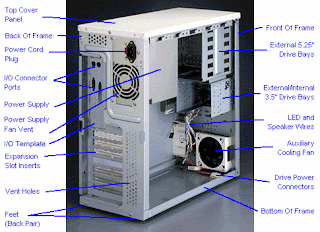
Image
Casing refers to the outer covering of the system unit.      There are two types of casing: Power casing

POWER PACK (Power supply unit)

Image
The system’s power supply unit provides electrical power for every component inside the system unit, as well as to the video display

KEYBOARD

Image
The keyboard is the most common type of input device. it looks like typewriter keyboard , but has more character and

PROCESSOR

Image
The processor is the major component of any system board. It can be thought as “Brain” of the computer system because it reads, interprets, and executes software instruction and also carries out arithmetic and logical operations for the system.

CD ROM DRIVES

Image
CD-ROM drives that operate at the speed of a conventional audio CD player are called single – speed (Ix) drives. Advanced drives that spin twice, and three times as first as the typical CD player are referred to as double – speed (2x) drives, triple – speed (3x) drives, and so forth. Single –speed drives transfer data at a rate of 150KB per second. Double – speed drive

HARD DISK DRIVE

Image
The system unit normally comes from the manufacturer with a floppy disk drive (FDD) a hard disk drive (HDD) , and a CD-Rom drive installed ; The system’s disk drive capacity is not usually limited to the standard units installed .In

RANDOM ACCESS MEMORY (RAM) AND READ ONLY MEMORY (ROM)

Image
Ram and Rom are the two types of computer memory that provides storage internal to the computer system. They are the primary storage areas in the computer system. They are part of the computer than holds data and instructions (programs) for processing as well as the intermediate and final results of processing. Note that the term “memory” is usually used as a short form for physical memory, which refers to the actual chips capable of storing data or information in bits. Ram: Ram is called temporary because as soon as the microcomputer is turned off, everything in ram is lost. It is also

SYSTEM MODULES

Image
A module is a separate unit of software or hardware. System modules are those computer components that can easily be changed. The typical characteristics of module components include portability which allows them to be used in a

SIMPLE HARDWARE MAINTENANCE TIPS:

Image
1.     When cleaning your computer, first spray cleaning solutions on a cloth then, apply the cloth to your computer. Never spray cleaning solution directly on the system compo

PC UPGRADE AND MAINTENANCE

Image
What is PC? PC is an acronym that stands for personal computer. They are those smallest, inexpensive and most familiar kinds of computers largely owned by individuals. They are also called micro computers. They can fit next to a desktop or can be carried around. They are most widely used and fastest growing type of computer. Micro computers are of several types they are: (PDA) and Palmtops. Desktop PCS, Tower PCS, Lap tops, Notebooks, Desktop PCS Personal digital assistance Desktop PCS : These are those in which the case or main housing sits on a desk, with keyboard in front and monitor often on top. Desktops are small enough to fit on top

HOW TO FORMAT A COMPUTER (USING WINDOWS XP)

Image
• Insert a formatting software in your computer and switch off your computer • Switch on your computer again and press any key to boot from CD Rom OR • Switch on your computer • Enter setup (press f10) to enter setup in some system it will ask you to press the escape key, or f2 to enter setup. • Select your language (English) • When you enter setup, you  set your  system to boot from CD Rom • You then save and exist when you must have set it to boot from CD Rom Note: This method should be carried on from the file menu, your system will restart, and then you press any key to boot from CD Rom. After setup environment or procedure, you will see these options which states

what you give is what you get

Image
  A WYSIWYG (pronounced "wiz-ee-wig") editor or program is one that allows a software developer to see what the end result will look like while the document is being created. WYSIWYG is an acronym that stands for "what you see is what you get". A WYSIWYG editor can be contrasted with more traditional editors that require the developer to enter descriptive codes and do not permit an immediate way to see the results of the markup. The first true WYSIWYG editor was a word processing

HOW TO CONNECT A COMPUTER

Image
HOW TO CONNECT A COMPUTER Procedures: ·         Stand the system unit casing and place the monitor on top of a table/desk, connect the monitor to the system unit using the monitor cable. Then connect the power cable of the system unit and monitor to the power source. ·         Connect the keyboard to the system unit with the keyboard cable.

ANTI-VIRUS SOFTWARE

Image
ANTI-VIRUS SOFTWARE These are special designed computer programs which are installed in the computer hard disks in order to fight against virus from going into the computer. In most cases, these anti-virus software are used to detect and repair any contaminated diskette or hard disks that are connected to the computer. EXAMPLES OF ANTI-VIRUS SOFTWARE ARE ·   Dr. Solomon anti virus software

COMMON VIRUSES WE HAVE ARE:

COMMON VIRUSES WE HAVE ARE: 1) Brain virus   2) Cookies   3) Scores 4) P.C stone/Marijuana   5) Madonna   6)Aids   7) Rain drops   8) Date crime   9) Friday the 13 th

HOW TO PREVENT COMPUTER VIRUS

HOW TO PREVENT COMPUTER VIRUS 1.            Ensure that your system has anti-virus program 2.            Keep all program disk/diskette in a conducive environment 3.            Avoid using disk from an unknown source

THE EFFECTS OF VIRUS TO THE COMPUTER SYSTEM

THE EFFECTS OF VIRUS TO THE COMPUTER SYSTEM 1.            It prevents the computer from booting or loading its memory 2.            It breaks down the partition sector of the hard disk or floppy disk program file 3.            It affects some system file such as program file, executable and command file 4.            It leads to disappearing of some computer files inside the computer system 5.            It makes the computer screen to show images to be double or looks draft 6.            Corruption of data files 7.            Delete of the file in the memory

VIRUS

VIRUS This means Vital Information Resource Under Siege. These are written programs designed by software programmers to prevent people from pirating or duplicating their software. When such programs are being duplicated, this computer virus will then be transmitted to the computer. It is very harmful and dangerous to the computer system because it makes the computer not to function effectively or even break down in some cases.

COMPUTER SECURITY

COMPUTER SECURITY Computer security is the protection of the computer components such as hardware, software data from an unauthorized access. The need for the computer security is as a result of a number of security breaches. SOURCES OF SECURITY BREACHES Security Breach is an act of breaking security policies, practices, or procedures. When security is breached, it result in the damage

DISADVANTAGES OF INTERNET IN THE SOCIETY

Image
DISADVANTAGES OF INTERNET IN THE SOCIETY Problems of internet are: Security, pornography, friendship, fraud and crime 1.      SECURITY: The internet is a highway that carries a great deal of personal and organization. To business, electronic link tend to be exposed to attack from both thieves and vandals.          Computer hackers would steal password and use them to break into a company’s database or security. Because of inadequate security, business transactions have been very effective and attractive through internet. Crackers may break into the systems database of banks, firms, industries and cyber cafés to manipulate their account, database file, just for the fun of it. 2.      PORNOGRAPHY: Pornography is a major problem in Nigeria. Most adolescents and teenagers go to the cyber café without their parent’s knowledge to watch pornographic pictures or movies.

BENEFITS OF INTERNET TO THE SOCIETY

BENEFITS OF INTERNET TO THE SOCIETY The internet plays a major role in the society in the following application areas: 1.      EDUCATION/ E-LEANING: With the internet, people can get educational materials and read them in preparation for examinations or use them for school assignments. The internet also enhances electronic learning whereby courses or subjects are taught online using audio and visual materials. 2.      E-REGISTRATION: The internet provides users with facilities for online registration for examination like WAEC, NECO, and JAMB etc.

SOME INTERNET TERMS AND ACRONYMS

Image
SOME INTERNET TERMS AND ACRONYMS INTERNET: International Network E-MAIL: Electronic Mail ID: stands for Identification. This is the column where one will be asked to enter your personal ID before you can use the E-mail software. This ID could be your name, numbers, alphabet, alphanumeric etc, where no two people can have the same ID. PASSWORD: This is the secret number or letters which is known by the user alone. This password gives you access to open your E-mail box, only you for security purpose should know this password. CHATTING: Chatting via net allows people who are on the computer network simultaneously to hold live interactive conversation. One can only chat one on one conversation when one happens to sign in at the same time.

THEORY OF INTERNET

THEORY OF INTERNET           The term internet which is simply called THE NET is a network of all networks that any person, who is connected online, gets easy information. It can also be defined as the interconnectivity of computers that are connected via telephone cables and satellite links around the world. It is a network that consists of millions of private, public, academic, business and government networks of local to global scope that are linked by a broad array of electronic and optical networking technologies.            It was founded by the advanced research project Agency (ARPA) of the U.S.A in the year 1969 which was recognized as ARPANET with the aim of new research information.

NETWORKING DEVICES

NETWORKING DEVICES   They are devices that aid connection and communication. The common network devices are: The hub, the network interface card, the switch, the router, the modem 1.      THE HUB: A hub is a device that connects all other devices in a star net work together. 2.      MODEMS: A modem is an acronym that stands for Modulator/Demodulator. It is a device that can convert digital data to an analogue data and vice versa. 3.      SWITCHES: A switch is a device that channels incoming data from any of network device to the specific device that is the destination of the data.

NETWORK TOPOLOGY

NETWORK TOPOLOGY         In computer networking, topology refers to the layout of connected devices. TYPES OF NETWORK TOPOLOGIES ARE: ·   Star topology ·   Bus topology ·   Ring topology ·   STAR TOPOLOGY: In a star topology network, the network devices are connected to a central point like a star. The central point may be a hub, a switch or router. All the individual network devices communicate with the central point. ·   BUS TOPOLOGY: Bus network topology uses a common back bone (a cable) to connect all devices. The back bone is a shared communication medium that all devices are attached or connected.

THEORY OF COMPUTER NETWORKING

THEORY OF COMPUTER NETWORKING NETWORKING: It can be defined as a group of computer and associated devices that are connected by communication devices such as telephone line, cable and modem.       A modem is a communication device responsible for the transmission of digital signals into analogue signal and vice versa. It is also a group of computer joined together with a commercial link.   COMPUTER NETWORKING: This is the inter-connection of group of computers so that they can easily share resources (information) such as document and printer together.

ICT-BASED GADGETS

ICT-BASED GADGETS ICT-based gadgets are basically devices used for information and communication technology. Some of the ICT-based gadgets are: 1.      MOBILE PHONE : A mobile phone is an electronic handheld device used to make mobile telephone calls common manufactures of mobile phones are MOTOROLAR, SAMSUNG, BLACKBERRY, e t c 2.      COMPUTERS: A computer is an electronic device for storing and processing data.   Computers come in various types: some common computer types are:

APPLICATIONS OF ICT

APPLICATIONS OF ICT 1.      TELECONFERENCING: Teleconferencing is a telephone meeting among two or more people using ICT. The message can be audio or video. It can be in form of the live- voice communication or voice massages or data and graphics over a telephone. 2.      VIDEO CONFERENCING: Video conferencing or video conference (also known as a video teleconference) is a set of interactive telecommunication technologies which allow two or more people in different location to interact via two way video and audio transmission simultaneously.

I.C.T

Image
I.C.T What is I.C.T?           I.C.T is an acronym that stands for information and communication technology. I.C.T covers any product that will store, retrieve, manipulate, transmit, send or receive information electronically in a digital form.      Products of I.C.T includes: Personal computers (PC), digital television, e-mail, robots etc. TYPES OF I.C.T 1.        Broadcasting 2.        Telecommunications 3.        Data networks 4.        Information systems 5.        Satellite communication BROADCASTING   It is the distribution of audio and video content in a dispersed audience through a medium such as radio, television etc.

COMPUTER PROFESSIONAL BODIES IN NIGERIA

Image
COMPUTER PROFESSIONAL BODIES IN NIGERIA 1.      NIGERIA COMPUTER SOCIETY (NCS): This association monitors the entire professional activities in the country. 2.      INSTITUTION OF MANAGEMENT INFORMATION SYSTEM (IMIS): They educate people on management information system course and also issue foreign certificates to those people. 3.      COMPUTER PROFESSIONAL REGISTRATION COUNCIL OF NIGERIA (CPRN): They register any computer professional that wants to join computer society/ group.

QUALITIES OF A GOOD COMPUTER PROFESSIONAL

QUALITIES OF A GOOD COMPUTER PROFESSIONAL 1.   COMPUTER MANAGER ·    Good computer manager should have ability to control, coordinate and manage things. ·    He/ She must be a computer literate. ·    He/She should be versatile in computer field. ·    He/She should be able to make good decisions. 2.   COMPUTER SCIENTIST ·    Good computer scientist should understand computer and what computer can do. ·    He/She should be able to give good advice on how to set up a computer business. ·    He/She should be able to repair and maintain computer. ·    He/She should be able to choose good computers for use.

COMPUTER PROFESSIONALS/PEOPLE WARE

COMPUTER PROFESSIONALS/PEOPLE WARE Computer professionals are the people that specialized in using computer to do one thing or the other. They are people who made use of computer. Computer professionals undergo serious training in their field of study, so that he or she will master its field and become professional in the field. Some of the computer professionals are. 1.                   COMPUTER MANAGER Computer manager is someone that specialized in the control and management of computer business. Computer manager makes decisions on how a particular job should be done.

PRECAUTIONS TO BE TAKEN WHEN WRITING PROGRAMS

PRECAUTIONS TO BE TAKEN WHEN WRITING PROGRAMS 1.               Do not rush. Be careful, stable and patience when writing programs. 2.               No step should be skipped. 3.               The order of execution must be followed sequentially. STEPS IN PROGRAM DEVELOPMENT

COMPUTER PROGRAM

COMPUTER PROGRAM

APPLICATION SOFTWARE

Image
APPLICATION SOFTWARE   These are software written to perform specific functions. The application software is written to solve particular problem. Application software can also be referred to as an application package. They may be written by commercial software manufacturers or could be produced by in-house programmers. Software packages are pre-written, pre-coded and commercially available set of programs for general use. TYPES OF APPLICATION PACKAGES We have different types of application packages, they are: 1.              WORD PROCESSING PACKAGE :   These are software used for word processing (typing). They can be called word processors.

COMPARISON OF LEVELS OF PROGRAMMING LANGUAGES

COMPARISON OF LEVELS OF PROGRAMMING LANGUAGES NO. MACHINE LANGUAGES LOW LEVEL LANGUAGES HIGH LEVEL LANGUAGES 1 It is directly understood by the hardware It is not directly understood by the hardware It is not directly understood by the hardware 2 It is most difficult to understand, since it’s written in binary. It is less difficult than machine language It is easier to understand compared to low level language and machine language 3 It offers the best performance since it is directly executed by the computer. It is equally fast but not as fast as machine language. It is slower in performance compared to low

LANGUAGE TRANSLATORS

Image
LANGUAGE TRANSLATORS A language translator is software that converts programs written in a source code into an object code that a computer understands. Translators as the name of suggest, translate human codes to a language understand by the computers. Translators require a programming language for their translation.         Examples of high level programming languages that requires translators are: BASIC (Beginners all purpose symbolic instruction codes), FORTRAN (Formula Translator), COBOL (Common Business Oriented Language), PASCAL . Etc. TYPES OF LANGUAGE TRANSLATORS     Types of language translators they are:

UTILITY SOFTWARE

UTILITY SOFTWARE            They are used for general house-keeping functions of the computer such as backing up files, repairing the computer, copying, sorting and printing of data. Examples of utility software are:

MICROSOFT WINDOWS

MICROSOFT WINDOWS (MICROSOFT WINDOWS AS AN OPERATING SYSTEM) A widow is a rectangular area on the desktop through which a program can receive input and also allow the user and the program to interact.                 VERSIONS OF MS WINDOWS ARE: Windows 95,Windows 98, windows 2000, windows XP {Experience}windows ME {Millennium Edition},Windows NT {New technology}, windows vista, wi8ndows 7, windows 8 etc Note that Ms Windows is based on the technology of the graphical user interface {GUI} this simply means that all the operations on file directories and disk commands are used by means of icons, tools menu. GUI is the technology of working with the computer system by using pictures instead of issuing commands to the computer by typing them on the key board; you can simply perform some actions on graphic using the mouse. ADVANTAGES OF MS WINDOWS ·         An ...

OPERATING SYSTEM

Image
OPERATING SYSTEM This is software responsible for controlling the allocation and usage of hardware resources in the computer system. It is a program that allows the computer to function and also allow the user to interact with the computer. It is the first program that must be load into the computer memory before application software can be run. It is the program which serves as a link between the computer and its user. Operating system is an example of system software. FUNCTIONS OF OPERATING SYSTEM 1.      It allows the user to create files, store file, run and link program 2.      It also allows the user to access printer and other peripherals.